30KPa Touchscreen Cordless Vacuum: Smarter Mode Control
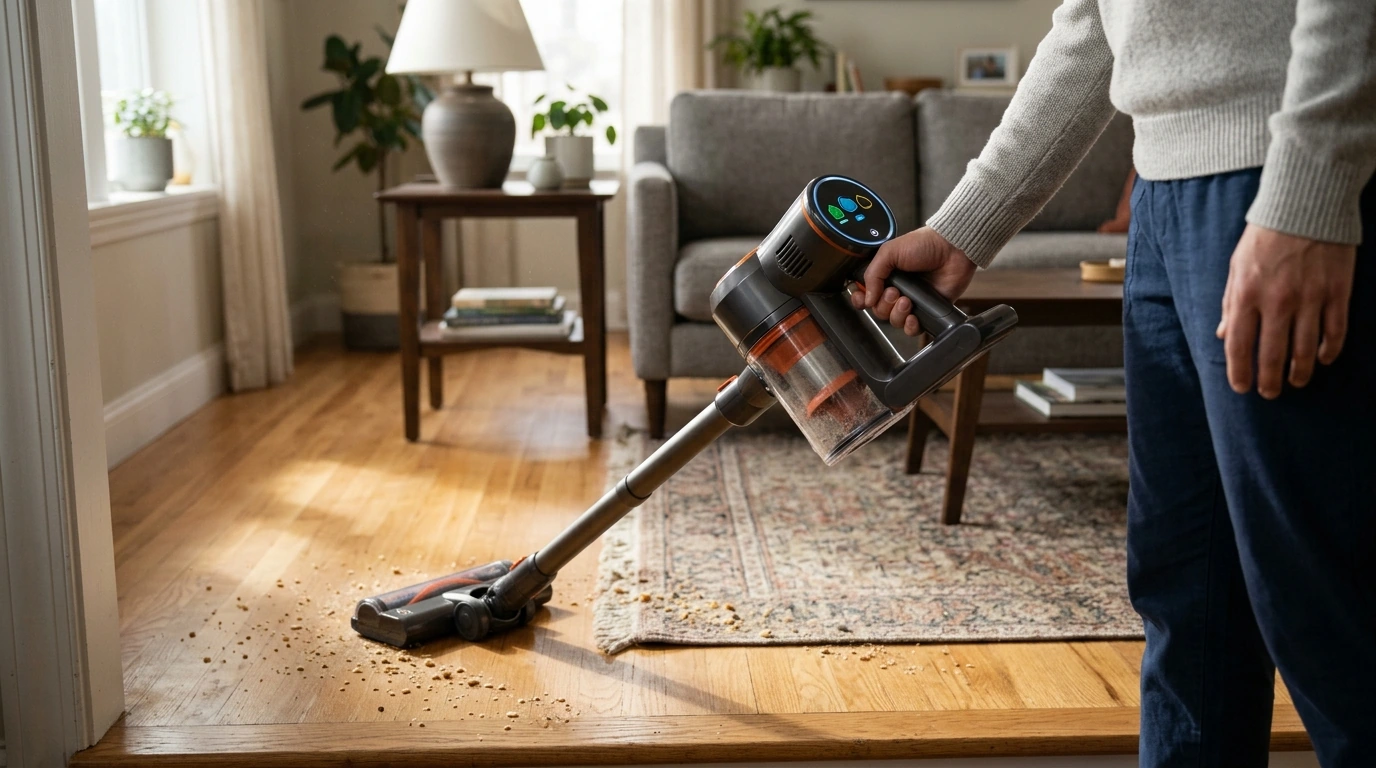
30KPa Cordless Vacuum Cleaner with Touchscreen: Clean Faster, Switch Modes Smarter
A cordless vacuum should make everyday cleaning feel automatic: grab it, see what’s going on at a glance, and move from floors to furniture without stopping to guess settings. Our 30KPa Cordless Vacuum Cleaner with Touchscreen is built around that idea—strong suction paired with a clear touchscreen so quick cleanups stay quick, and deeper cleans stay organized.
What the touchscreen adds to everyday cleaning
When you can clearly see what the vacuum is doing, you spend less time second-guessing and more time actually cleaning. A touchscreen makes everyday use more predictable, especially in homes with mixed flooring and multiple people taking turns.
- Instant visibility: you can check status at a glance instead of relying on vague indicator lights.
- Fewer interruptions: you can adjust modes as the surface changes (hard floors, rugs, upholstery) without losing momentum.
- More consistent results: when settings are easy to see and change, you’re more likely to use the right power level for the job.
- Better shared-home experience: different users can quickly understand what mode is active and when it’s time to empty or recharge.
Suction power that matches real-world messes
Suction isn’t just a spec—it’s what decides whether crumbs come up in one pass or you end up doing cleanup “laps.” A 30KPa-class cordless vacuum is designed for everyday debris (crumbs, tracked-in grit, lint) and the dust that collects along edges and under furniture.
- Use lower power for light maintenance: quick daily passes can stay quieter and help stretch runtime in smaller spaces.
- Use higher power for problem zones: entryways, corners, and high-traffic paths tend to hold onto grit and fine particles.
- Slow down on rugs and mats: controlled, overlapping passes give the brush and airflow time to lift debris instead of scattering it.
If indoor air quality is a priority in your home, regular vacuuming and good dust control habits matter as much as raw suction. The U.S. Environmental Protection Agency’s overview of indoor air quality is a helpful reference for building healthier routines: EPA: Introduction to Indoor Air Quality.
A simple cleaning routine that stays on schedule
The easiest cleaning plan is the one you’ll actually keep. Our team recommends a “short reset, then one focused pass” rhythm so dust and grit don’t snowball into marathon sessions.
- Two-minute resets: hit the kitchen and entryway daily to prevent grit from spreading into bedrooms and living areas.
- Midweek detail pass: focus on edges, around table legs, and the “no-man’s-land” under cabinets where dust lines form.
- Weekend deeper clean: work room-by-room and finish with stairs, upholstery, and the car (as long as your attachments fit the spaces you want to reach).
- Make the touchscreen work for you: keep the vacuum in a consistent mode for each room type, then change only when the surface changes.
For carpeted areas, technique matters. The Carpet and Rug Institute shares practical vacuuming guidance that aligns with what we see in day-to-day homes: Carpet and Rug Institute (CRI): Vacuuming Tips.
Battery and charging habits that keep it ready
A cordless vacuum earns its keep when it’s always within reach and ready to run. Small habits make a big difference in how often you actually grab it.
- Treat cordless as a “ready-to-go tool”: store it where it’s easy to grab, not where it’s out of sight.
- Top-up charging beats emergency charging: plugging in after smaller sessions helps you avoid starting a bigger clean on a low battery.
- Reserve maximum power for true hotspots: this typically helps runtime feel more predictable across the week.
- Keep air pathways clear: filters and a too-full dust cup restrict airflow and can make performance feel weaker mid-session.
Dust cup and filter care for steady performance
Most “my vacuum isn’t picking up” moments come down to airflow: a packed cup, a clogged filter, or hair wrapped where it shouldn’t be. Keeping up with basics helps your vacuum perform like it did on day one.
Where a cordless vacuum shines (and when a canister makes sense)
Quick fit guide: cordless touchscreen vacuum vs. canister vacuum
| Need | Best match | Why it helps | In-stock option |
|---|---|---|---|
| Daily crumbs, grit, quick touch-ups | Cordless vacuum with touchscreen | Grab-and-go convenience; easy mode changes as surfaces change | 30KPa Cordless Vacuum Cleaner with Touchscreen ($73.01) |
| Long cleaning sessions across multiple rooms | Canister vacuum | No battery planning; steady performance for extended cleans | Lightweight Canister Vacuum Cleaner ($104.01) |
| Stairs and tight corners | Cordless vacuum with handheld flexibility | Less lifting and dragging; easier angle control | 30KPa Cordless Vacuum Cleaner with Touchscreen ($73.01) |
| Scheduled deep-clean days | Canister vacuum (as primary or backup) | Comfortable for extended passes; useful for larger homes | Lightweight Canister Vacuum Cleaner ($104.01) |
Getting the most out of the touchscreen during a clean
FAQ
Does the touchscreen show battery status and cleaning mode?
The touchscreen is designed to give you clear, at-a-glance status so you can track key info like active mode and battery/alerts when available. During setup, get familiar with the icons so you can interpret status quickly mid-clean.
Is a 30KPa cordless vacuum suitable for both hard floors and rugs?
Yes, 30KPa-class suction paired with the right mode and a slower pace typically works well across mixed flooring. On rugs and mats, overlapping passes help lift debris that sits deeper in the pile.
How often should the dust cup and filters be cleaned?
Empty the dust cup frequently—ideally before it packs tight—so airflow stays strong. Filters should be maintained on a regular schedule based on how often you vacuum, and any washable filter needs to be completely dry before reinstalling.








Leave a comment